

Ticket triage with close-call review
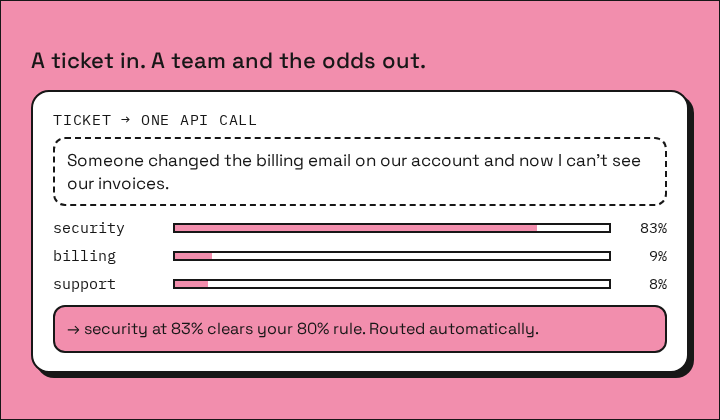
Send a ticket. Get the team that should own it, a probability for each team, an urgent flag and a priority. Clear tickets route themselves; close calls go to a person.
Remix it with your coding agent
Examples
- 02 Copy the prompt
- 03 Paste it into your coding agent (Claude Code, Codex, Cursor or another) in your project.
Read the full prompt
Adapt this for [what I want to build].

You're working in my codebase. Add a decision step that routes items in my application the way the Spinda "ticket triage" recipe routes support tickets: one API call returns a choice among my destinations plus the probability of every option, and close calls go to a person instead of the wrong place.

## How the recipe works

- Input: one item of text (a ticket, lead, email, order note, form submission).
- One HTTPS request to the Spinda decision API asks named, typed questions about that item:
  - `choice`: pick one of my destinations; each option has a short description.
  - `noul` (optional): the probability that a yes/no condition is true.
  - `score` (optional): an expected level on an ordered rubric, 0 to N-1, can be fractional.
- The response has `answers.<name>.choice` and `answers.<name>.probabilities` (every option), `answers.<name>.noul`, `answers.<name>.score`, and `usage` (input tokens and cost). The model doesn't write text; it scores the options I give it.
- My code acts on the answer. Rule of the recipe: if `probabilities[choice]` is at least a threshold (default 0.80), route automatically; otherwise send to a human review path with the probabilities attached. Don't use the `confidence` field as the top probability; it's a different quantity.

## Reference request (the recipe's exact shape)

POST https://api.spinda.ai/v1/systemone
Headers: `Authorization: Bearer $SPINDA_API_KEY`, `Content-Type: application/json`, `Idempotency-Key: <stable id per item, e.g. item-<id>-v1>`

```json
{
  "model": "decision-model-large",
  "state": "<the item text>",
  "questions": {
    "team": {
      "type": "choice",
      "instructions": "Choose the team that should own this ticket. Prefer security for suspected unauthorized access, even if billing is also mentioned.",
      "criteria": {
        "billing": "Payments, invoices, refunds, duplicate charges, and subscription billing.",
        "engineering": "Bugs, failed requests, integrations, performance, and service outages.",
        "security": "Account compromise, unauthorized access, exposed credentials, and vulnerabilities.",
        "sales": "Plans, upgrades, pricing, procurement, and enterprise purchases.",
        "support": "How-to questions, account setup, and requests that do not fit another team."
      }
    },
    "urgent": {
      "type": "noul",
      "instructions": "Does this ticket need immediate attention because there is an active outage, suspected account compromise, data loss, or a time-critical blocker? A routine request or frustrated tone alone is not urgent."
    },
    "priority": {
      "type": "score",
      "instructions": "Rate the operational priority using the concrete impact described. Do not assume an outage or security incident without evidence.",
      "criteria": ["Low: general question or future request with no current blocker", "Normal: routine issue affecting one person, with a workaround or no time pressure", "High: important work is blocked or several users are affected", "Critical: active security incident, data loss, or widespread production outage"]
    }
  }
}
```

The state is billed once per request for all questions. Price: $0.039 per million input tokens; output is free. Limits: up to 64 questions and 255 options per question, 1 MiB JSON body.

## What to do

1. Read my project and find where these items arrive and where routing or branching happens now. If you can't tell which items to route or what the destinations are, ask me one short question; otherwise proceed.
2. Replace the example questions with mine: my destinations as `choice` options with short, mutually exclusive descriptions, plus any yes/no or score questions that help. Keep the question names stable; they become my code's field names.
3. Call the API only from server-side code (backend, worker, serverless function or my workflow tool's HTTP step). Read the key from the environment variable `SPINDA_API_KEY`. Never put the key in browser code, logs, test fixtures or this chat. If it isn't set, keep going in sample mode and tell me: request access at https://spinda.ai (each request is reviewed by hand), create a key in https://console.spinda.ai, and add `SPINDA_API_KEY=...` to my local `.env` (and make sure `.env` is git-ignored).
4. Send an `Idempotency-Key` per logical item so retries replay instead of charging twice. On 429, back off and retry with the same key and body (honor `Retry-After`). On 503, the request was not charged: send the item to the human path. On 402, the allowance is exhausted: surface a clear error.
5. Add the threshold rule as configuration (default 0.80) and a human review path that shows the top options with their probabilities.
6. Add a sample mode that returns three fixed, plausible responses in the real shape, so tests and local runs work without a key. Label sample output as sample wherever it's displayed or logged. Never present sample results as model output.
7. Write tests for: the request body for one of my items, branching above and below the threshold, 429/503/402 handling, and that the key never reaches client code.
8. Run the tests. If `SPINDA_API_KEY` is set, make one live call on a harmless example item and show me the full response and `usage`. Then tell me what you changed, how to run it, and what you couldn't verify.

## Keep

- The functional boundary: Spinda only scores the options; my code decides what happens.
- The human path for close calls, and the probabilities next to every automated decision.
- No logging of item text alongside credentials; log request IDs, choices and probabilities.
What you need
- A project or workflow tool that can make a server-side HTTPS request
- A Spinda API key for live calls. Without one, the app runs on saved sample answers.
Open this request in the playground ↗
For live calls, request API access , create a key in the console and put it in your project's .env file. Never paste a key into a chat with your agent.
Limits
- 0.80 is a starting threshold, not a tuned one. Raise it to send more tickets to a person; lower it to automate more.